Apache Kafka Explained: Topics, Partitions, Brokers, and Consumer Groups
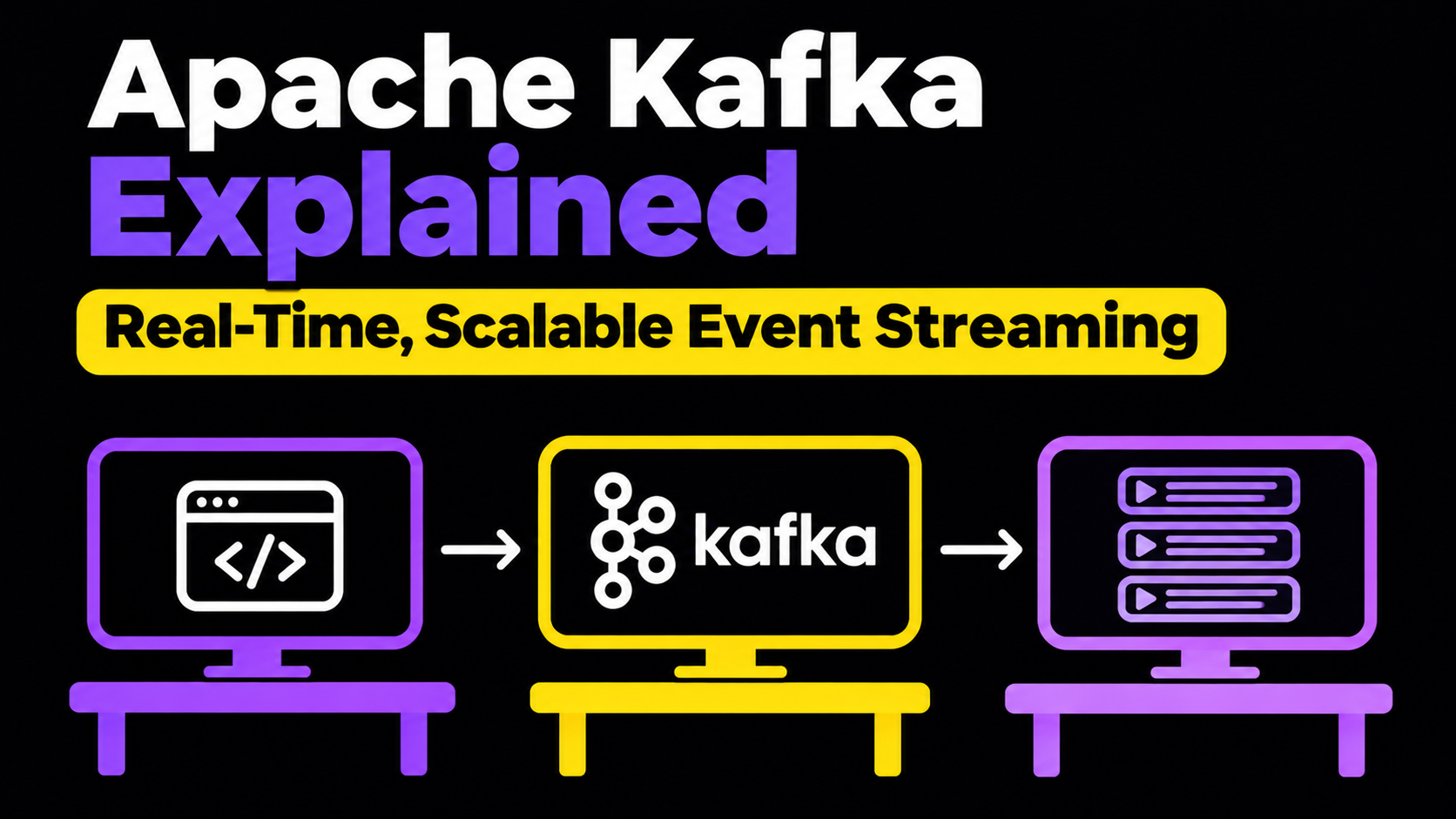
Apache Kafka is a distributed event-streaming platform used to handle large volumes of real-time data. It allows different services to communicate through events without being tightly coupled.
Imagine an e-commerce application where a user places an order. Multiple services might need to react to this event:
- Billing Service: Processes the payment.
- Notification Service: Sends an order confirmation email.
- Analytics Service: Tracks the order.
- Inventory Service: Updates available stock.
- Search Service: Updates product or order-related search data.
Instead of making the Order Service communicate directly with every other service, we can publish an event to Kafka. Other services can independently consume and process that event.
Let's understand how Kafka works internally, how it distributes messages, and how it handles large-scale event processing.
What Is a Kafka Topic?
A Topic is a logical category used to organize related events in Kafka.
Think of a topic as a collection of events belonging to a particular business operation.
For example, an e-commerce application might have the following topics:
| Topic | Purpose |
|---|---|
orders |
Stores order placement events |
payments |
Stores payment-related events |
refunds |
Stores refund requests |
notifications |
Stores notification events |
user-events |
Stores user activity events |
Whenever a user places an order, the application publishes an event to the orders topic.
Similarly, whenever a refund is initiated, an event is published to the refunds topic.
This separation makes it easier for different services to subscribe to only the events they need.
Kafka Uses an Append-Only Log
One of the most important concepts in Kafka is its Append-Only Log architecture.
Unlike traditional queue systems, where messages are commonly removed after consumption, Kafka stores events in an ordered log.
This means:
- New events are appended to the end of the log.
- Existing events are not modified in place.
- Consumers do not delete events simply by reading them.
- Multiple consumer groups can independently read the same events.
- Events remain available according to the configured retention policy.

Understanding Retention Policy
Imagine that we configure Kafka to retain events for seven days.
Even after a consumer processes an event, that event remains available in Kafka until the retention policy removes it.
Kafka supports retention based on:
- Time: How long events should be retained.
- Size: How much storage a topic can use.
For example:
log.retention.hours=168
This represents seven days when used as the relevant broker-level configuration.
Topic-level retention settings can override broker defaults.
Important: Retention is independent of consumer processing. Kafka can delete an event after its retention period even if a consumer has not processed it.
Understanding Kafka Partitions
Imagine that our application receives 5,000 order events per second.
If we have only one consumer processing these events, it might not be able to process them as quickly as they arrive.
This creates a backlog.
To solve this problem, Kafka divides a topic into smaller parts called Partitions.
A partition is an ordered, append-only log that stores a subset of the events belonging to a topic.
For example, our orders topic might have three partitions:

| Partition | Events |
|---|---|
| Partition 0 | Order 101, 104, 107 |
| Partition 1 | Order 102, 105, 108 |
| Partition 2 | Order 103, 106, 109 |
Instead of processing all events through one consumer, we can distribute the work across multiple consumers.
How Does Kafka Decide Which Partition Gets an Event?
Kafka supports different partitioning strategies:
- Key-based partitioning: Events with the same key are generally routed to the same partition.
- Round-robin partitioning: Events are distributed across partitions when no key-based routing is used, depending on producer configuration.
- Custom partitioning: Developers can implement their own partitioning logic.
For example, suppose we use userId as the partition key.
All events associated with the same user will generally go to the same partition.
This is useful when we need to preserve event ordering for a particular user.
Important: Kafka guarantees ordering within a partition, not across multiple partitions.
Understanding Kafka Brokers
A Broker is a Kafka server responsible for storing and serving Kafka data.
A Kafka cluster can contain multiple brokers.
For example:
| Broker | Responsibility |
|---|---|
| Broker 1 | Stores partition data |
| Broker 2 | Stores partition data |
| Broker 3 | Stores partition data |
Kafka distributes partitions across brokers to improve scalability and availability.
Instead of depending on a single server, we can add more brokers to increase the cluster's storage and processing capacity.
This is known as Horizontal Scaling.
Kafka also supports replication, where partition replicas are maintained across multiple brokers.
If a broker fails, an available replica can take over, depending on the replication and availability configuration.
Kafka Architecture: How Everything Works Together
Now let's connect all the concepts.
A typical Kafka architecture consists of producers, brokers, topics, partitions, and consumers.

The overall event flow looks like this:
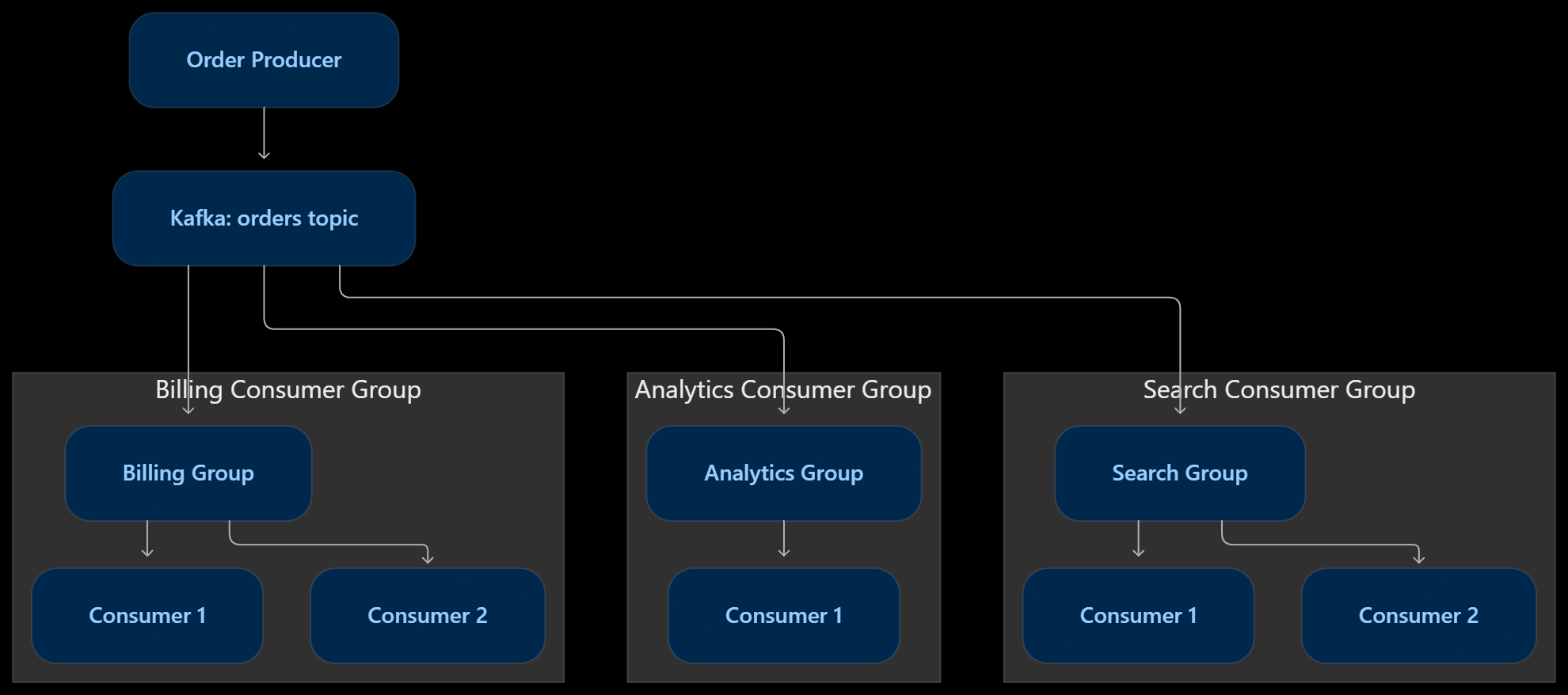
Here's what happens:
- Producers publish events to a Kafka topic.
- Kafka distributes events across topic partitions.
- Brokers store and serve these partitions.
- Consumers fetch events from their assigned partitions.
- Consumers process events and manage their reading positions using offsets.
This architecture allows Kafka to handle large volumes of events while distributing the workload.
How Do Messages Reach Kafka Consumers?
There are two common messaging delivery models:
- Push-based: The broker pushes messages to consumers.
- Pull-based: Consumers request messages from the broker.
Kafka primarily follows the pull-based model.
This means consumers request records from Kafka instead of Kafka continuously pushing messages to them.
For example:
- A consumer requests records from Kafka.
- Kafka returns available records.
- The consumer processes those records.
- The consumer requests more records.
Understanding Consumer Offsets
Kafka uses something called an Offset to track a consumer's reading position.
An offset is a sequential identifier assigned to a record within a partition.
For example:
| Offset | Event |
|---|---|
| 0 | Order placed |
| 1 | Payment initiated |
| 2 | Payment completed |
| 3 | Order shipped |
| 4 | Order delivered |
Suppose a consumer has successfully processed records up to offset 2.
It can commit its progress so that it can continue from the appropriate position later.
This is called Offset Management.
Offsets are maintained independently for each partition and consumer group.
If a consumer crashes, it can resume from its committed offset. However, records processed after the last committed offset might be processed again.
Understanding Kafka Consumer Groups
Consumer Groups are one of the most important concepts in Kafka.
Imagine we have three consumers processing order events.
Initially, all three consumers belong to the same consumer group.
Kafka distributes partitions among these consumers so they can process events in parallel.
For example:

| Consumer | Assigned Partition |
|---|---|
| Consumer 1 | Partition 0 |
| Consumer 2 | Partition 1 |
| Consumer 3 | Partition 2 |
Each partition is assigned to only one consumer within the same consumer group at a time.
This prevents multiple consumers in that group from independently processing the same partition records during normal operation.
What Happens When We Add More Consumers?
Suppose our topic has three partitions and three consumers.
Now we add a fourth consumer to the same consumer group.
What happens?
The fourth consumer will remain idle because there are only three partitions to assign.
This gives us an important rule:
A consumer group cannot have more active consumers than the number of partitions for a topic.
| Partitions | Consumers | Active Consumers |
|---|---|---|
| 3 | 1 | 1 |
| 3 | 2 | 2 |
| 3 | 3 | 3 |
| 3 | 4 | 3 |
| 3 | 5 | 3 |
Adding more consumers beyond the available partitions will not increase parallelism for that topic.
If we want more parallel processing, we need to consider increasing the number of partitions.
Kafka automatically reassigns partitions when group membership changes. This process is called Rebalancing.
Same Consumer Group vs Different Consumer Groups
This is where Kafka becomes particularly powerful.
Let's understand two different scenarios.
Consumers Belonging to the Same Group
Suppose we have three consumers:
- Consumer A
- Consumer B
- Consumer C
All three belong to the billing-group.
Kafka distributes partitions among these consumers.
Each partition is assigned to one consumer within the group.
The purpose is to distribute processing work across multiple consumers.
This is commonly used when we want to scale a single service horizontally.
Consumers Belonging to Different Groups
Now imagine we have three independent services:
- Billing Service
- Analytics Service
- Search Service
Each service has its own consumer group.
| Consumer Group | Purpose |
|---|---|
billing-group |
Processes payments |
analytics-group |
Tracks business metrics |
search-group |
Updates search indexes |
Kafka allows every consumer group to independently read the same topic.
This means the same order event can be processed by all three services.
Within each group, Kafka distributes partitions among its consumers.
Across different groups, each group maintains its own offsets and reading progress.
This architecture is commonly known as Fan-Out or the Publish-Subscribe pattern.
Understanding the Complete Consumer Group Architecture
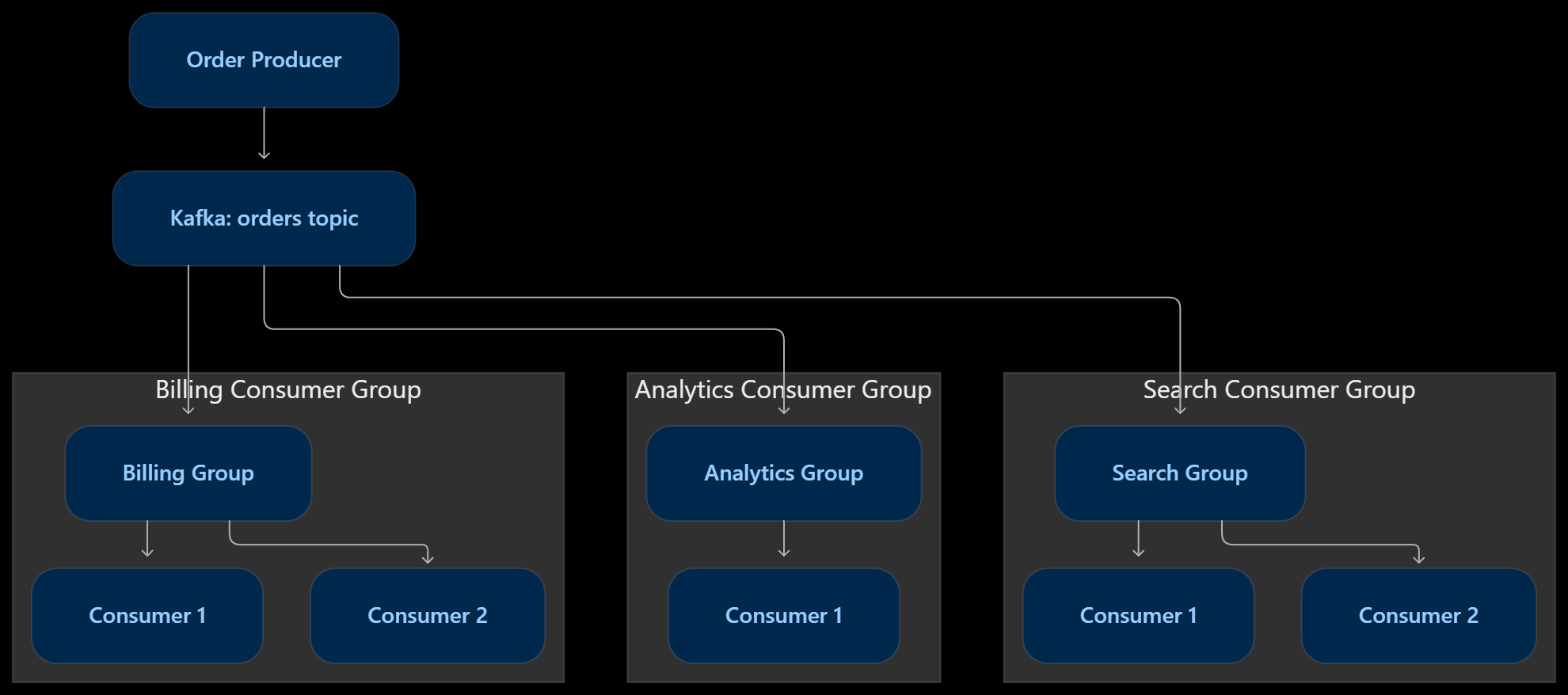
Whenever an order event is published:
- Billing group receives the event.
- Analytics group receives the event.
- Search group receives the event.
However, within the Billing group, only the consumer assigned to the event's partition processes it.
The same applies to the other groups.
This allows Kafka to support both parallel processing and independent event consumption.
Handling Duplicate Message Processing
One common misconception is that Kafka Consumer Groups automatically guarantee exactly-once processing.
They do not.
Let's understand why.
Suppose a user places an order, and our consumer receives the corresponding event.
The consumer successfully sends an email but crashes before committing its offset.
When the consumer restarts, Kafka may deliver the same event again.
As a result, the user could receive the same email twice.
This is called Duplicate Processing.
How Can We Prevent It?
There are several approaches:
- Idempotency: Make processing safe to repeat. For example, use an event ID to prevent sending the same business notification twice.
- Database Transactions: Update business data and record the processed event in a single database transaction.
- Offset Management: Commit offsets at the appropriate point in the processing workflow.
- Kafka Transactions: Use Kafka's transactional features when consuming and producing Kafka records and committing offsets atomically.
Kafka supports exactly-once processing guarantees for specific Kafka-to-Kafka workflows using transactions.
However, when external systems such as databases, payment gateways, or email providers are involved, additional coordination or idempotency mechanisms are required.
Remember: Exactly-once business execution is not automatically guaranteed by Kafka.
Replaying Events: One of Kafka's Biggest Advantages
Let's say our Analytics Service has a bug.
It has processed thousands of order events, but due to incorrect application logic, some analytics records were calculated incorrectly.
What can we do?
We can fix the application and replay the events from Kafka.
Since Kafka retains events independently of consumer processing, a consumer group can reset its offsets and read previously retained events again.
For example:
- Original consumer position: Offset 500.
- Required replay position: Offset 0.
- The consumer can start reading again from the earlier position, provided those records are still available.
This is particularly useful for:
- Rebuilding search indexes.
- Recalculating analytics.
- Recovering from application bugs.
- Migrating data into a new service.
- Testing new event-processing logic.
This replay capability is one of the major reasons Kafka is widely used in event-driven architectures.
Key Kafka Components at a Glance
| Component | Responsibility |
|---|---|
| Producer | Publishes events to Kafka |
| Topic | Organizes related events |
| Partition | Divides a topic into ordered logs |
| Broker | Stores and serves Kafka data |
| Consumer | Reads and processes events |
| Consumer Group | Distributes partition processing |
| Offset | Tracks consumer reading progress |
| Retention | Controls how long events remain available |
| Replication | Maintains copies of partitions for availability |
Apache Kafka Interview Questions and Answers
What is Apache Kafka?
Apache Kafka is a distributed event-streaming platform used to publish, store, and consume events at scale. It is commonly used in event-driven architectures, real-time analytics, and distributed systems.
What is a Kafka Topic?
A topic is a logical category used to organize related events. Producers publish events to topics, and consumers subscribe to them.
What is a Kafka Partition?
A partition is an ordered log within a topic. Kafka uses partitions to distribute data across brokers and enable parallel processing.
What is a Kafka Broker?
A broker is an individual Kafka server responsible for storing and serving topic partitions. Multiple brokers together form a Kafka cluster.
What is a Consumer Group?
A consumer group is a collection of consumers that work together to process events from a topic. Kafka distributes partitions among consumers within the group.
What happens if we have more consumers than partitions?
Consumers beyond the available partition count remain idle because a partition can be assigned to only one consumer within the same group at a time.
What is a Kafka Offset?
An offset is a sequential identifier assigned to each record within a partition. Consumers use offsets to track their reading progress.
What is Consumer Rebalancing?
Rebalancing is the process of redistributing partition assignments among consumers when consumers join, leave, or fail within a consumer group.
What is the difference between the same and different consumer groups?
Consumers in the same group share the workload by processing different partitions.
Consumers in different groups independently consume the same topic events.
Does Kafka delete messages after consumption?
No. Kafka retains messages according to the configured retention policy, regardless of whether consumers have processed them.
Does Kafka guarantee exactly-once processing?
Kafka supports exactly-once semantics for specific transactional workflows, particularly Kafka-to-Kafka processing. However, external side effects require additional mechanisms such as idempotency and database transactions.
What is the difference between Kafka and a traditional message queue?
Traditional message queues commonly remove messages after successful acknowledgment. Kafka retains events according to its retention policy and allows multiple consumer groups to independently replay and process the same events.
Final Thoughts
Kafka is more than just a messaging system. It provides a distributed architecture for building scalable, event-driven applications.
The most important concepts to remember are:
- Topics organize related events.
- Partitions enable parallel processing.
- Brokers store and serve events.
- Consumer Groups distribute processing workloads.
- Offsets track consumer progress.
- Retention allows events to remain available for replay.
- Different Consumer Groups enable multiple services to independently process the same events.
About the author
Hi there! I'm Aditya, a passionate Full-Stack Developer driven by a love for turning concepts into captivating digital experiences. With a blend of creativity and technical expertise, I specialize in crafting user-friendly websites and applications that leave a lasting impression. Let's connect and bring your digital vision to life!
Comments
Join the discussionNo comments yet. Be the first to comment.